
Designing an online course is not the same as putting your face-to-face materials into an LMS. Effective online courses are intentionally structured for asynchronous (and sometimes synchronous) learning — where students engage with content, peers, and the instructor on their own schedules.
Whether you're teaching online for the first time or redesigning an existing course, this guide gives you a practical framework for building a course that actually works in a digital environment.
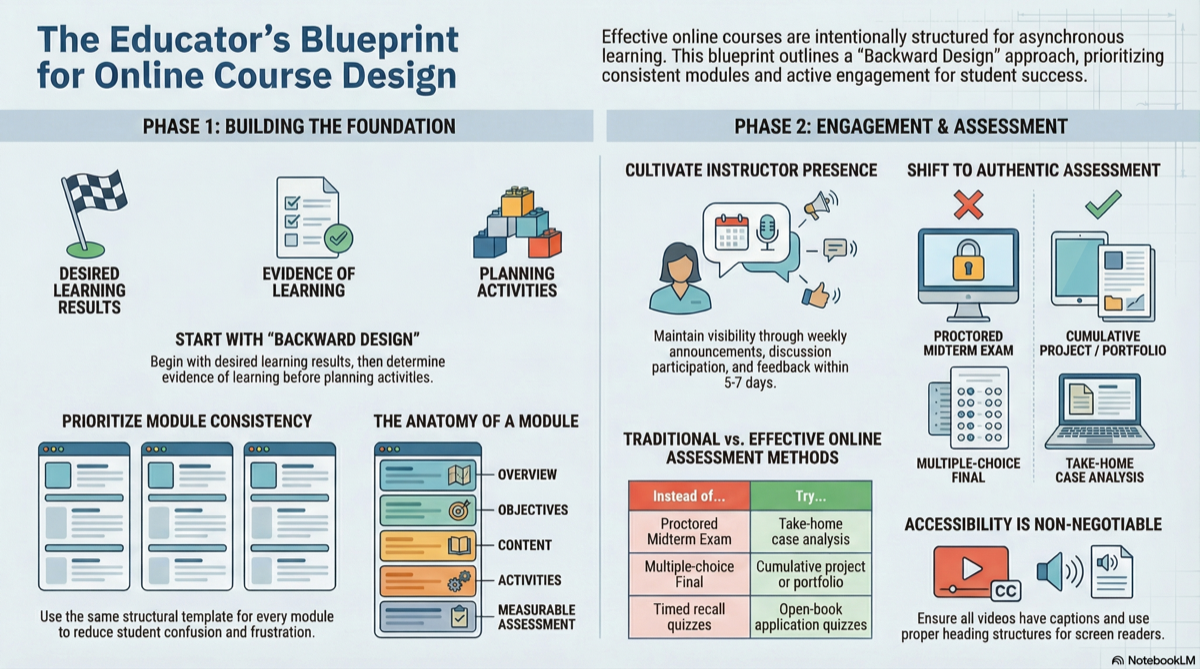
The Foundation: Backward Design
The most effective online courses start with the end, not the beginning. This approach, known as backward design, follows three steps:
- Identify your desired results — What should students know and be able to do?
- Determine acceptable evidence — How will you know they've learned it?
- Plan learning experiences — What activities and content will get them there?
This order matters. Too many online courses start with "What content do I have?" rather than "What do students need to learn?" Starting with objectives keeps your course focused and prevents content bloat.
Module Structure: The Building Block of Online Courses
Online courses live or die by their module structure. Each module should be a self-contained learning unit that students can complete in one week (or your chosen rhythm).
Anatomy of a Strong Online Module
Every module should include these components, in a consistent order:
- Module Overview — What this module covers, why it matters, and how it connects to previous and upcoming modules
- Learning Objectives — 2-4 specific, measurable objectives using Bloom's Taxonomy verbs
- Content Delivery — Readings, recorded lectures, videos, or interactive content
- Learning Resources — Supplementary materials, external links, recommended readings
- Discussion Activity — Prompts that require critical thinking, not just opinion sharing
- Practice Activity — An exercise, case study, or hands-on task
- Assessment — A quiz, assignment, or project milestone that measures the module objectives
Consistency is Key
Use the same structure for every module. Online students navigate independently — if Week 3 has a different layout than Week 5, confusion and frustration follow. Create a template and stick with it.
Engagement Strategies That Actually Work
Discussions That Go Beyond "Post and Reply"
The default online discussion — "Post your response and reply to two classmates" — produces shallow engagement. Try these alternatives:
- Debate format: Assign students opposing positions on a topic. They must argue a side they may not agree with.
- Case study analysis: Present a scenario and ask students to apply course concepts to recommend a course of action.
- Peer teaching: Each student explains a concept to the group as if they were the instructor.
- Real-world connection: Students find and analyze a current news article or event related to the module topic.
Presence and Communication
Online students need to feel that their instructor is present, even asynchronously:
- Weekly announcements — A brief message at the start of each week summarizing what's ahead
- Timely feedback — Return graded work within 5-7 days. Students lose motivation when they submit into a void.
- Discussion participation — Don't just grade discussions; contribute to them. A well-placed instructor comment elevates the entire thread.
- Virtual office hours — Offer at least one weekly session via Zoom or Teams. Record it for students who can't attend.
Assessment Design for Online Courses
Rethink the High-Stakes Exam
Traditional proctored exams are problematic online — they create anxiety, require expensive proctoring tools, and test memorization more than understanding. Consider alternatives:
| Instead of... | Try... |
|---|---|
| Proctored midterm exam | A take-home case analysis |
| Multiple-choice final | A cumulative project or portfolio |
| Timed quizzes | Open-book quizzes that test application, not recall |
| One paper at the end | Scaffolded assignments building toward a final product |
Scaffolded Assignments
Break major projects into checkpoints throughout the semester:
- Week 3: Topic proposal and initial research question
- Week 6: Annotated bibliography or literature review
- Week 9: Draft with peer review
- Week 12: Final submission
This approach prevents last-minute cramming, gives students feedback along the way, and distributes your grading workload.
Rubrics Are Non-Negotiable
Every graded assignment in an online course needs a rubric. Students can't swing by your office to ask "What are you looking for?" Rubrics:
- Set clear expectations before submission
- Speed up your grading significantly
- Reduce grade disputes
- Ensure consistency across students
Accessibility: Design for Everyone
Online courses must be accessible to all students, including those with disabilities. This isn't just good practice — it's a legal requirement under ADA and Section 508.
Essential Accessibility Practices
- Add captions to all videos — auto-captions are a start, but review for accuracy
- Use headings properly — H1, H2, H3 in order (not just bold text that looks like a heading)
- Provide alt text for images — describe what the image shows and why it matters
- Use sufficient color contrast — don't rely on color alone to convey information
- Offer multiple formats — if content is in a video, also provide a transcript or written summary
- Test with a screen reader — or at minimum, use your LMS's built-in accessibility checker
Tools and Technology
Must-Have Tools
| Tool Category | Purpose | Examples |
|---|---|---|
| LMS | Course delivery and management | Canvas, Blackboard, Moodle, D2L |
| Video recording | Lectures and announcements | Loom, Panopto, Zoom recordings |
| Communication | Student interaction | LMS messaging, email, Slack |
| Assessment | Quizzes and grading | LMS built-in tools, Turnitin |
Nice-to-Have Tools
| Tool Category | Purpose | Examples |
|---|---|---|
| Interactive content | Engagement | H5P, Nearpod, Padlet |
| Collaboration | Group work | Google Docs, Miro, Jamboard |
| Polling/feedback | Quick checks | Poll Everywhere, Mentimeter |
Quality Check: Before You Launch
Before your course goes live, run through this checklist:
- All modules follow the same structure and naming convention
- Every assignment has a rubric, due date, and clear instructions
- All links work (broken links are the #1 student complaint in online courses)
- Videos have captions
- The syllabus is posted and easy to find
- The gradebook is configured to match the syllabus grading breakdown
- You've navigated the course in student view from start to finish
- A colleague or friend has reviewed the course for clarity
The 80/20 Rule of Online Course Design
You don't need a Hollywood-production-quality course. You need a well-organized, clearly communicated course with consistent structure and meaningful activities. Focus your energy on:
- Clear objectives — so students know what they're working toward
- Consistent structure — so they never feel lost
- Meaningful assessments — so they actually learn
- Instructor presence — so they feel supported
Everything else is polish. Get these four things right first.
Designing an online course? CourseDev generates complete module content for online, hybrid, and face-to-face courses — including learning objectives, discussions with rubrics, assignments, assessments, and curated resources. Start building your course for free.