
Let's be honest — the AI hype in education has been exhausting. Every week there's a new tool promising to "revolutionize" teaching, and most of them either don't understand what faculty actually need or require so much setup that you'd be faster doing it yourself.
But some AI tools genuinely save time. Not in a theoretical, conference-keynote kind of way — in a "I got my Sunday evening back" kind of way. This is a practical guide to what's actually working for educators in 2026, based on the tasks that eat most of your time.
Where AI Actually Helps (and Where It Doesn't)
Before diving into tools, it's worth being direct about where AI falls short. AI is not great at understanding your specific students, navigating departmental politics, or replacing the judgment calls you make mid-lecture when a discussion takes an unexpected turn. Those things require a human who knows the room.
Where AI shines is the repetitive, structural work that takes hours but doesn't require your unique expertise — first drafts, formatting, generating variations, and organizing content you already know.
Think of it this way: AI handles the scaffolding. You handle the teaching.
Course Design and Outline Generation
This is where AI tools for educators have the biggest impact. Building a course from scratch — writing learning objectives, structuring modules, aligning assessments — is important work, but it's also incredibly time-consuming. Most faculty spend weeks on it.
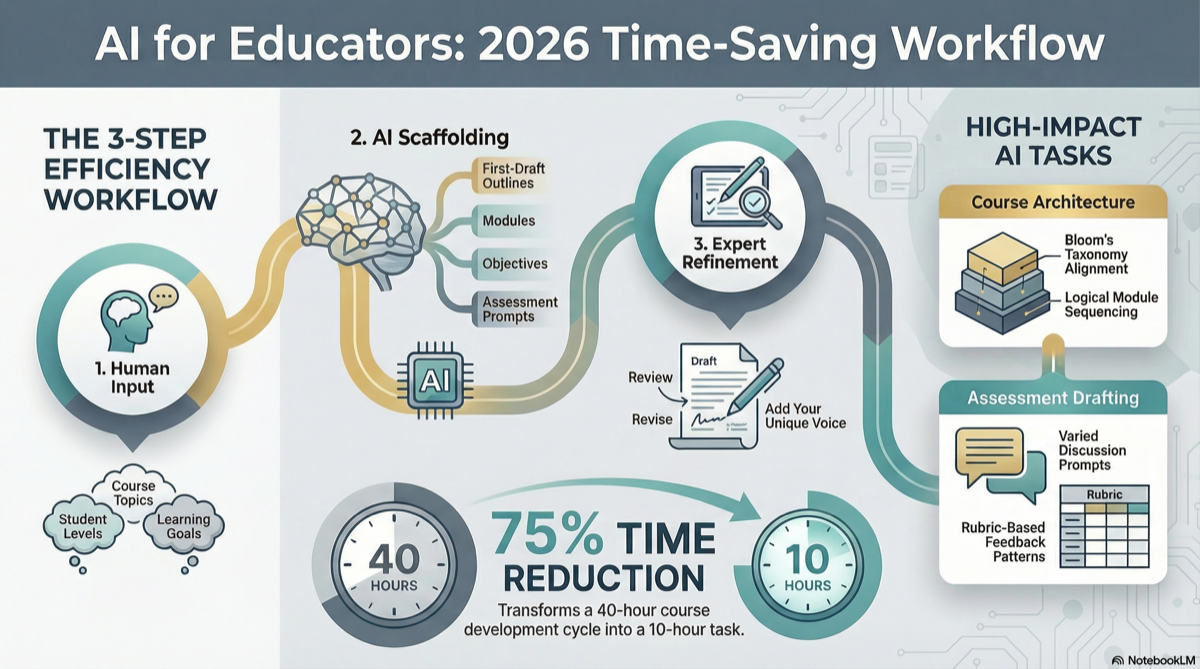
AI course design tools can generate a complete course outline in minutes: learning objectives aligned to Bloom's Taxonomy, a logical module sequence, and assessment strategies that map back to your objectives. You review, revise, and make it yours.
The key is starting with a solid structure. If you haven't thought through your course learning objectives or course outline yet, AI tools work best when you feed them clear inputs — even a rough list of topics and your target student level is enough to get a useful first draft.
Content Generation and Module Building
Once you have an outline, the next time sink is building out each module — writing discussion prompts, creating assignment instructions, drafting rubrics, putting together reading lists, and developing talking points.
This is where a lot of faculty burn out, especially adjuncts juggling multiple preps. You know what you want to teach, but translating that into polished, student-facing content for eight or ten modules takes forever.
AI tools can generate first drafts of all of this. Not final drafts — first drafts. The distinction matters. You still need to review everything, add your voice, adjust for your students, and cut anything that doesn't fit. But starting from a draft instead of a blank page is a fundamentally different experience. It turns a 40-hour task into a 10-hour task.
Discussion and Assessment Generation
Writing good discussion prompts is one of those tasks that seems simple until you're staring at Module 6 trying to come up with something that isn't just a repeat of Module 4. Same with quiz questions — writing 15 questions per module across an entire course adds up fast.
AI tools can generate varied, level-appropriate discussion prompts and assessment questions tied to your module objectives. The best ones give you options at different Bloom's levels so you're not stuck with surface-level recall questions.
A practical tip: generate more than you need and pick the best ones. It's faster to curate than to create from scratch.
Grading and Feedback Assistance
AI-assisted grading is real, but it comes with caveats. Tools that help with rubric-based feedback on structured assignments — lab reports, short answers, coding exercises — are genuinely useful. They can flag patterns, suggest feedback language, and speed up the turnaround.
But for essays, research papers, and anything that requires nuanced evaluation of student thinking? Use AI as a first-pass filter, not a decision-maker. Students know the difference between thoughtful feedback and boilerplate, and your credibility depends on the former.
What to Look for in an AI Teaching Tool
Not all AI tools for educators are built the same. Here's what separates the useful ones from the gimmicky ones:
- Education-specific design — general-purpose chatbots can help, but tools built for course design understand Bloom's Taxonomy, module structures, rubric formats, and accreditation alignment. That saves you the work of explaining what you need.
- Editable output — if you can't easily revise what the tool generates, it's not useful. You need Word docs, not locked PDFs.
- Alignment built in — the best tools connect learning objectives to assessments to module content automatically, so you're not doing alignment mapping by hand.
- Low setup time — if it takes two hours to configure the tool before it does anything useful, that defeats the purpose.
The Tools That Don't Work
For the sake of saving you time: be skeptical of tools that promise to "grade essays with AI" as a complete solution, chatbots marketed as "AI tutors" that don't integrate with your course content, and anything that requires your students to sign up for yet another platform. The adoption friction alone will kill it.
Also, be wary of tools that generate content you can't edit or export. If the content lives only inside their platform, you're locked in — and you lose control over your own course materials.
A Realistic Approach
Here's what a practical AI workflow looks like for most faculty:
- Start with your course goals — even a rough idea of topics and outcomes
- Use AI to generate your first draft — outline, objectives, module content
- Review and revise — add your expertise, cut what doesn't fit, adjust the tone
- Export and own it — the final product should be yours, in a format you control
You're not outsourcing your teaching to AI. You're outsourcing the formatting, the boilerplate, and the blank-page problem. The expertise, the judgment, and the relationship with your students — that's still entirely you.
Want to see this workflow in action? CourseDev generates complete course content — learning objectives, module materials, discussions, assignments, and assessments — from your course details. Review it, revise it, and make it yours. Try it free.