
Hybrid courses sound great in theory — students get face-to-face interaction and the flexibility of online learning. Administrators love them. Students request them. And then someone hands you a course section marked "hybrid" and says, "Good luck."
The reality is that hybrid course design is harder than fully online or fully in-person. You're not just teaching one course — you're designing two interconnected learning experiences that need to feel like one cohesive whole. Get it wrong and students feel like they're taking two half-courses that don't talk to each other.
But get it right, and hybrid might be the best format you've ever taught. Here's how.
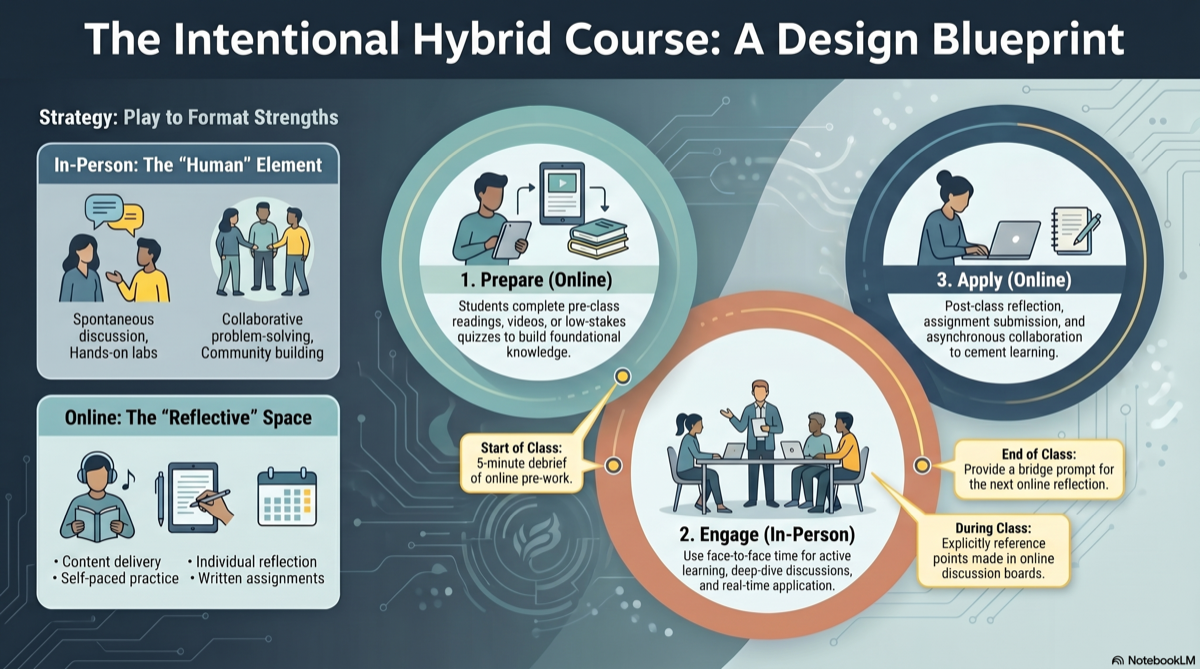
What Hybrid Actually Means
Let's clear up the terminology, because "hybrid" gets used loosely. A true hybrid course intentionally divides learning between in-person sessions and online components, where both are essential — not optional, not supplementary.
This is different from:
- HyFlex, where students choose each week whether to attend in-person or online
- Web-enhanced, where the course is primarily face-to-face with some online materials
- Fully online with optional meetups, which is just an online course with extra steps
In a well-designed hybrid course, the in-person and online components each do what they do best. The key word is intentional. Every element belongs where it is for a reason.
The Core Principle: Play to Each Format's Strengths
This is where most hybrid course design falls apart. Instructors take their face-to-face course, cut some sessions, and dump the rest online. That's not hybrid design — that's subtraction.
Instead, ask yourself: What is each format best at?
In-person sessions are best for:
- Discussions that benefit from real-time, spontaneous exchange
- Hands-on activities, labs, and simulations
- Collaborative problem-solving and group work
- Building community and instructor presence
- High-stakes presentations or peer review
Online/asynchronous components are best for:
- Content delivery (readings, recorded lectures, videos)
- Individual reflection and writing
- Self-paced practice and low-stakes quizzes
- Discussion boards that give students time to think before responding
- Submitting and reviewing assignments
When you divide your course this way, students aren't just getting "less" of an in-person course — they're getting the right activities in the right format.
Step 1: Start With Your Learning Objectives
Before deciding what goes where, get clear on what students need to achieve. Write your course learning objectives first, then design backward from there.
For each objective, ask: Is this best demonstrated through real-time interaction, or through independent work? That answer tells you which format owns that objective.
Step 2: Build Your Course Outline With Both Modes in Mind
Your course outline needs to show how in-person and online components connect week by week. Students should never wonder, "Why are we meeting in person this week?" or "What does this online assignment have to do with Tuesday's class?"
A strong hybrid outline follows a prepare → engage → apply rhythm:
| Phase | Format | What Happens |
|---|---|---|
| Prepare | Online (before class) | Students read, watch, or complete a pre-class activity |
| Engage | In-person | Active learning — discussion, problem-solving, application |
| Apply | Online (after class) | Reflection, practice, assignment submission |
This isn't a rigid formula, but it gives every week a clear logic that students can follow.
Step 3: Design the Handoff Points
The transitions between online and in-person are where hybrid courses live or die. Every in-person session should reference what students did online, and every online activity should connect to what happened (or will happen) in class.
Practical ways to create smooth handoffs:
- Start class with a 5-minute debrief of the online pre-work — "What surprised you?" or "What questions came up?"
- End class with a bridge prompt — "Based on today's discussion, your online reflection this week is..."
- Reference online discussions in person — "Several of you raised [point] in the discussion board. Let's dig into that."
- Use online quizzes as class prep — low-stakes quiz on readings before class ensures everyone arrives prepared
Without these handoffs, students treat the online and in-person components as separate courses. With them, the hybrid design feels seamless.
Step 4: Set Expectations Early and Clearly
Hybrid courses confuse students more than any other format. They miss in-person sessions because they think the course is online. They skip online work because they think it's optional. They don't check the LMS because they assume everything happens in class.
Your syllabus and first-day communication need to address this head-on:
- Publish a weekly schedule that clearly labels which days are in-person vs. online
- Explain why the course is hybrid — not just "it is," but what the benefit is to them
- State that online components are required, not supplementary
- Set a consistent weekly rhythm — same structure every week reduces confusion
- Post a "this week" announcement every Monday summarizing what's due and when to show up
Consistency is the single most important thing for student success in hybrid courses. If your structure changes week to week, students will get lost.
Step 5: Don't Halve Your Assessments
A common mistake: cutting the number of assessments because "we only meet half as often." This leaves gaps in your ability to gauge student learning and gives students fewer opportunities to demonstrate mastery.
Instead, distribute assessments across both formats:
| Assessment Type | Format | Why It Works There |
|---|---|---|
| Quizzes | Online | Self-paced, instant feedback, low-stakes prep |
| Discussions | Both | Online for depth, in-person for spontaneity |
| Group projects | In-person launch, online collaboration | Kickoff face-to-face, work asynchronously |
| Presentations | In-person | Real-time feedback and Q&A |
| Reflections | Online | Time to think, write, and revise |
| Exams | Either | In-person for proctoring, online for take-home formats |
Map every assessment back to your learning objectives. If an objective isn't being assessed in either format, something is missing. Our guide on creating a course outline walks through this alignment in detail.
Common Hybrid Course Design Mistakes
1. Treating online weeks as "off" weeks. If students perceive online weeks as lighter, they'll disengage. Online components should have equal weight and clear deliverables.
2. Recording in-person lectures and posting them online. This sounds helpful but actually discourages attendance. Instead, create separate, purpose-built content for each format.
3. No instructor presence online. If you only engage with students in person, the online component feels like an afterthought. Post announcements, respond to discussion boards, and give feedback on online submissions promptly.
4. Overloading in-person sessions. With fewer face-to-face meetings, the temptation is to cram everything in. Resist. Use in-person time for what only works in person, and let the online component carry the rest.
A Note for Adjuncts and New Hybrid Instructors
If you're teaching hybrid for the first time — especially as an adjunct balancing multiple preps — don't try to build everything from scratch. The most efficient approach is to start with a solid course outline and module structure, then decide the in-person/online split for each module.
AI tools designed for course building can generate your module content, discussion prompts, and assessments, which you then assign to the appropriate format. This cuts the design time dramatically while ensuring alignment between your objectives, content, and assessments.
The Bottom Line
Hybrid course design isn't about splitting a course in half. It's about building one integrated course that uses two formats intentionally. When each component has a clear purpose and the handoffs between them are smooth, students don't experience "online days" and "class days" — they experience a course that works.
Designing a hybrid course? CourseDev generates complete module content for online, hybrid, and face-to-face courses — with learning objectives, discussions, assignments, and assessments ready to assign across formats. Start building your course for free.