
If you've been teaching the same course for five or ten years, you don't need someone to build your course for you. You have slides. You have assignments that work. You have a grading system your students understand and a rhythm that took years to develop.
So when you hear about an AI tool that "generates course content," your first reaction is probably: I already have course content. Why would I want someone else's?
That's a reasonable reaction. And it's exactly why CourseDev gives you a Word document.
The Problem With LMS-Ready Packages
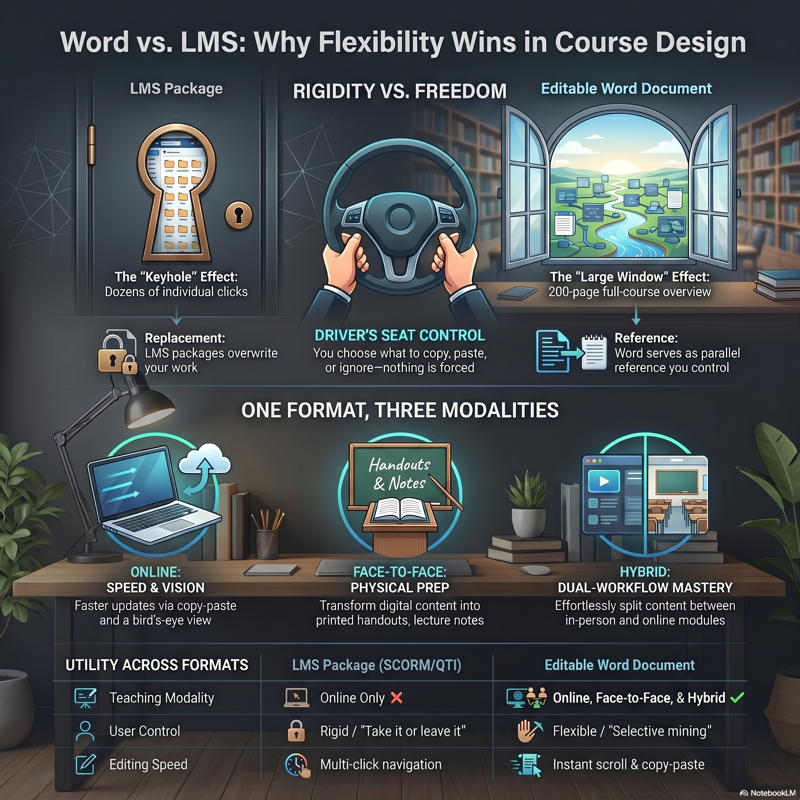
An LMS-ready export — a SCORM package, a Common Cartridge, a QTI file — is designed to replace what's already in your course shell. You import it, and suddenly your carefully built Canvas or Blackboard course has someone else's module structure, someone else's assignment descriptions, and someone else's discussion prompts where yours used to be.
For a brand-new course with nothing built yet, that might be fine. But for an experienced instructor? It's the opposite of helpful. You didn't need a replacement. You needed a reference.
There's also a fundamental limitation people don't talk about: LMS packages only work for online courses. They import into a digital course shell. If you're teaching face-to-face or hybrid, a SCORM file doesn't help you prepare your in-class lecture notes, print handouts, or plan your whiteboard exercises. It's a format built for one modality pretending to serve all of them.
A Word Document Is a Draft, Not a Directive
When CourseDev generates your course content, it delivers a Word document. Not because we couldn't build an LMS export — but because a Word document does something an LMS package can't: it stays out of your way and works everywhere you teach.
A 200-page Word document sitting on your desktop is a reference. You open it alongside your existing course. You scan the module outlines. You read a discussion prompt and think, "That's a better way to frame this question than what I've been using." You find an assessment approach you hadn't considered. You borrow what's useful and ignore what's not.
Nothing gets imported. Nothing gets overwritten. Nothing changes in your LMS until you decide to change it.
That's the point. You're in the driver's seat. The document is your passenger — useful, but not touching the steering wheel.
One Document, Every Modality
The biggest practical advantage of Word format is that it works across all three teaching modalities — not just online. Here's how faculty use it in each:
Online Courses
This is where people assume an LMS package would be more convenient. But even for fully online courses, the Word document is faster to work with.
Need to update a discussion prompt? In a Word document, you search, find the prompt, copy it, and paste it into your LMS editor. Done. With an imported LMS package, you navigate to the module, click into the activity, click "edit," scroll to find the text, make your change, save, and navigate back. That's four or five extra clicks per edit — multiplied across eight modules, it adds up fast.
The Word format also lets you see your entire course at a glance. Scroll through 200 pages and you can spot gaps, redundancies, or misaligned assessments in minutes. In an LMS, you'd have to click into every module, every activity, every assignment individually. You're seeing your course through a keyhole instead of a window.
Face-to-Face Courses
An LMS package is almost useless here. Your face-to-face course lives in your lecture notes, your printed handouts, your slide decks, and the talking points you carry into the classroom.
A Word document fits directly into that workflow. You can:
- Copy talking points into your lecture notes or PowerPoint slides
- Print module overviews as handouts for students
- Pull exercise descriptions into your in-class activity sheets
- Reference assessment rubrics while grading physical submissions
- Highlight and annotate sections directly in Word as you prep for each class session
The document becomes your prep companion — open on one side of your screen while your slides are on the other. That's how experienced face-to-face instructors have always worked. CourseDev simply gives them better raw material to work with.
Hybrid Courses
Hybrid courses are where the Word format advantage is clearest, because you're managing two workflows simultaneously: in-person sessions and online components.
With a Word document, you can:
- Split content by modality — copy discussion prompts and quizzes into your LMS for the online weeks, and pull talking points and exercise instructions into your lecture prep for in-person days
- Reorganize the sequence — cut and paste modules or sections to match your specific in-person/online split, which varies every semester depending on the schedule
- Maintain one reference document for the entire course, regardless of where each component gets delivered
Try doing any of that with a SCORM package. You can't. The LMS import is a rigid structure that assumes everything lives online. Hybrid teaching doesn't work that way.
What Experienced Faculty Actually Do With It
We built CourseDev expecting most users to be new instructors building courses from scratch. What we found is that experienced faculty use it differently — and often get more value from it.
They generate a parallel version of their existing course. Same subject, same level, same number of modules — but with fresh learning objectives, different activity ideas, and alternative assessment approaches. Then they compare it side-by-side with what they already have.
They mine it for ideas, not content. A generated discussion prompt might not be perfect, but it sparks a better version. A suggested scaffolding sequence might reveal a gap in their current module progression they hadn't noticed. The value isn't in the text itself — it's in what the text makes them think about.
They use it to break out of the rut. After years of teaching the same course, it's hard to see it with fresh eyes. Your module order feels inevitable because it's the order you've always used. A generated alternative challenges your assumptions in a way that reading another textbook doesn't.
They copy-paste selectively. A rubric criterion here. A module overview there. An exercise they'd never thought of. The Word format makes this effortless — highlight, copy, paste into your existing document, LMS editor, or slide deck. Try doing that with a SCORM package.
Why Not Both?
A fair question: why not offer a Word document and an LMS export?
Because the LMS export changes the relationship. The moment you can click "import," the tool shifts from reference to replacement. And replacement is the wrong model for someone who's spent years building a course that works.
The Word document keeps the tool honest. It says: Here are ideas. You decide what to do with them. That constraint is a feature, not a limitation.
It also keeps the tool universal. A Word document works whether you teach online, hybrid, or face-to-face. Whether you use Canvas, Blackboard, Moodle, or D2L. Whether you're a community college adjunct with three preps or a tenured professor redesigning a course you've taught for a decade.
You Don't Need a New Course. You Need New Perspective.
If you've been teaching for years, you're not short on content. You're short on time to rethink your content. You know your course outline could be tighter, your assessments could be more intentional, your discussion prompts could push students harder. But redesigning a course you're actively teaching? There's never enough time.
CourseDev doesn't replace your course. It drafts a different version of it — a version with fresh ideas, current pedagogical approaches, and Bloom's-aligned objectives — and hands it to you in a format where you control what happens next.
A Word document. On your desktop. Ready when you are.
CourseDev generates complete course content — learning objectives, module materials, discussions, assignments, and assessments — delivered as an editable Word document that works across online, hybrid, and face-to-face courses. Try it free.